
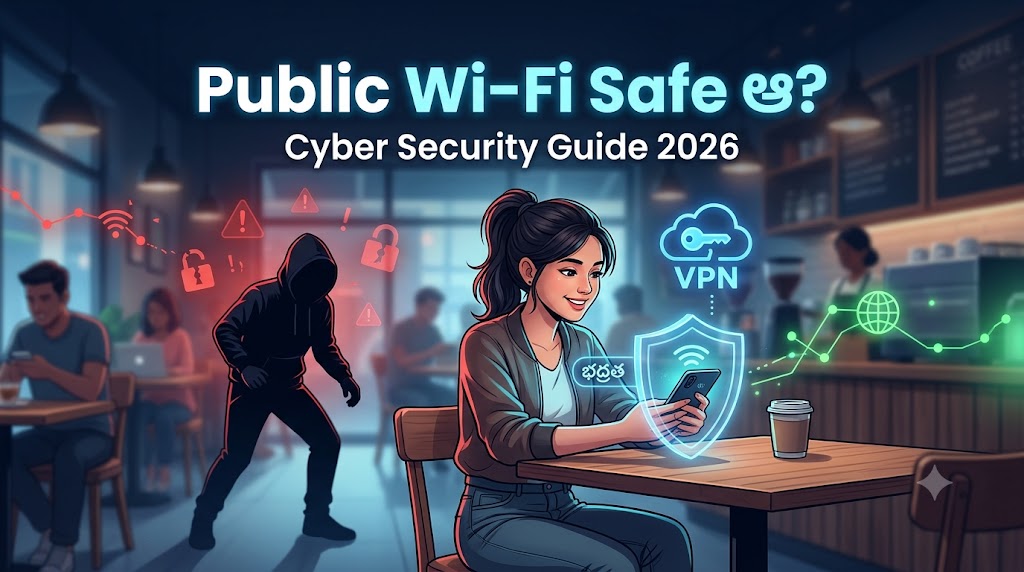
పరిచయం (Introduction)
Coffee shop లో కూర్చొని free Wi-Fi వాడుతూ Instagram scroll చేయడం, airport లో waiting time లో YouTube చూడడం . ఇవి ఈ రోజుల్లో చాలా common గా మారాయి. Public Wi-Fi అందరికీ convenient గా అనిపిస్తుంది, ముఖ్యంగా mobile data అయిపోయినప్పుడు.
కానీ ఒక్క నిమిషం ఆలోచించండి , మీరు ఆ free Wi-Fi వాడేటప్పుడు మీ personal data, bank details, passwords అన్నీ safe గా ఉన్నాయా?
సత్యం చెప్పాలంటే, public Wi-Fi 100% safe కాదు. అయితే దాన్ని వాడకూడదని కాదు , safe గా వాడటం తెలుసుకోవాలి. ఈ complete Telugu guide లో public Wi-Fi risks ఏమిటో, hackers ఎలా attack చేస్తారో, మరియు మీరు ఎలా safe గా browse చేయవచ్చో step-by-step చెప్తాం.
Public Wi-Fi అంటే ఎవరైనా free గా connect చేసుకోగలిగే wireless network. దీన్ని మీరు ఈ చోట్ల చూసి ఉంటారు:
- Cafes & Restaurants — “Free Wi-Fi Available” బోర్డులు
- Airports & Railway Stations — ప్రయాణికులకు free connectivity
- Shopping Malls — customer convenience కోసం
- Hospitals & Government Offices — visitor Wi-Fi
- Hotels & Guest Houses — room లేదా lobby Wi-Fi
- Libraries & Colleges — student access points
ఈ networks సాధారణంగా password లేకుండా open ఉంటాయి, లేదా ఒక simple shared password తో accessible గా ఉంటాయి. అంటే అక్కడ ఉన్న ఎవరైనా ఆ same network use చేస్తున్నారు . మీతో పాటు strangers కూడా.
Short answer: పూర్తిగా safe కాదు.
Public Wi-Fi networks open గా ఉన్నప్పుడు, మీ data encrypt కాకుండా internet కి వెళ్తుంది. ఇది ఒక post card పంపినట్లు , దారిలో ఎవరైనా చదవగలరు.
అయితే, అన్ని situations లో panic అవ్వాల్సిన అవసరం లేదు. మీరు weather check చేయడం, news చదవడం, YouTube video చూడడం వంటి basic tasks కి పెద్ద risk లేదు. Problem ఏమిటంటే, చాలా మంది ఇవే networks లో banking చేస్తారు, passwords enter చేస్తారు, sensitive files share చేస్తారు . అప్పుడే danger పెరుగుతుంది.
Key rule: Public Wi-Fi లో sensitive పనులు చేయకపోవడమే best decision.
1. Data Interception (Man-in-the-Middle Attack)
మీరు website తో communicate చేసేటప్పుడు, hacker మీ మధ్య కూర్చొని మీ data చదువుతాడు. మీకు తెలియకుండా మీ passwords, messages, bank info అన్నీ steal చేయవచ్చు.
2. Evil Twin Attack (Fake Wi-Fi Networks)
Hyderabad airport లో మీరు “Airport Free WiFi” అని connect చేసుకున్నారు. కానీ అది real airport Wi-Fi కాదు , ఒక hacker create చేసిన fake network. మీరు ఏ website తెరిచినా, హతుడు అన్నీ చూస్తాడు.
3. Unencrypted Networks
Password లేని networks లో మీ data plaintext గా travel చేస్తుంది. ఎవరైనా simple tools తో ఇది capture చేయవచ్చు.
4. Malware Distribution
కొన్ని fake Wi-Fi networks మీ phone కి automatically malware install చేయడానికి try చేస్తాయి, especially outdated software ఉన్న devices కి.
5. Session Hijacking
మీరు login అయిన తర్వాత, hacker మీ session token steal చేసి మీ account కి access పొందవచ్చు , మీ password తెలియకుండానే.
Hackers sophisticated గా లేరు . వారికి basic tools మాత్రమే కావాలి. ఇవి common methods:
Packet Sniffing: Network traffic monitor చేసే tools వాడి, unencrypted data capture చేయడం. Wireshark వంటి tools freely available.
Rogue Hotspot Setup: Attacker “Free_Mall_WiFi” అని ఒక fake hotspot create చేస్తాడు. మీరు connect అయిన moment నుండి మీ internet traffic అతని గుండా వెళ్తుంది.
SSL Stripping: HTTPS connection ని HTTP కి downgrade చేసి, మీ secure communication ని intercept చేయడం.
DNS Spoofing: మీరు bank website visit చేయడానికి try చేస్తే, fake bank website కి redirect చేయడం . exactly same looking.
ఇవి చదివి భయపడకండి. Awareness ఉంటే చాలు వీటి నుండి protect అవ్వడం possible.
Public Wi-Fi లో ఈ పనులు మాత్రం avoid చేయండి:
Financial Transactions:
- Internet banking లాగిన్
- UPI payments (Google Pay, PhonePe, Paytm)
- Credit/Debit card details enter చేయడం
- Stock market trading
Sensitive Account Access:
- Email password మార్చడం
- Social media password reset
- New accounts create చేయడం
- Government portals (Aadhaar, DigiLocker, UMANG)
Personal & Professional Data:
- Office documents upload/download
- Client data access
- Personal photos/videos share చేయడం
- OTP based logins for important accounts
Shopping:
- Amazon, Flipkart లో checkout , especially card save చేయడం
- Any e-commerce payment gateway
Sometimes situation అలాంటిది , mobile data లేదు, urgent work ఉంది. అప్పుడు ఈ steps follow చేయండి:
Step 1: Network Verify చేయండి Cafe లేదా hotel staff కి confirm చేయండి actual Wi-Fi name ఏమిటో. “StarBucks WiFi” అని ఒక real network ఉంటే, “Starbucks Free WiFi” అని nearby hacker network ఉండవచ్చు.
Step 2: Auto-Connect Off చేయండి Phone Settings లో “Auto-connect to saved networks” disable చేయండి. ఇది అపాయకరమైన networks కి automatically join అవ్వకుండా prevent చేస్తుంది.
Step 3: File Sharing Disable చేయండి Android లో: Settings → Network → Advanced → disable file sharing iPhone లో: Settings → General → AirDrop → Nobody
Step 4: HTTPS Websites మాత్రమే Use చేయండి URL bar లో 🔒 lock icon చూసి confirm చేయండి. “https://” తో start అయ్యే websites encrypt అవుతాయి.
Step 5: VPN వాడండి (Optional కానీ Helpful) VPN మీ connection encrypt చేస్తుంది. Proton VPN, Windscribe వంటి trusted free options ఉన్నాయి.
Step 6: పని అయిన తర్వాత Network Forget చేయండి Settings → Wi-Fi → Network name → “Forget Network” press చేయండి. Future లో same name తో fake network ఉంటే auto-connect కాదు.
Step 7: Software Update చేయండి Latest OS updates security patches తో వస్తాయి. Phone always updated గా ఉంచండి.
VPN (Virtual Private Network)
VPN మీ internet traffic ని encrypt చేసి, ఒక secure tunnel గుండా send చేస్తుంది. Public Wi-Fi లో hacker మీ data చూడటం దాదాపు impossible అవుతుంది.
కానీ VPN magic shield కాదు. మీరు phishing site visit చేస్తే, VPN protect చేయదు. మంచి trusted VPN వాడండి — NordVPN, ExpressVPN (paid), లేదా Proton VPN (free version available).
HTTPS — Lock Icon ఉన్న Websites
URL లో “https://” ఉంటే ఆ website మీతో encrypted communication చేస్తుంది. “http://” ఉంటే మీ data plaintext గా వెళ్తుంది — danger!
Chrome లో settings లో “Always use HTTPS” enable చేయవచ్చు.
2FA — Two Factor Authentication
మీ password leak అయినా, 2FA ఉంటే attacker login చేయలేడు. OTP phone కి వస్తుంది, అది attacker దగ్గర లేదు.
Gmail, Instagram, banking apps — అన్నింటిలో 2FA enable చేయండి. ఇది ఒక్కసారి setup చేస్తే biggest security upgrade.
Mobile Data vs Public Wi-Fi
Sensitive పనుల కోసం mobile data మేలు. మీ carrier encrypted network వాడుతుంది, publicly accessible కాదు. Data pack కొంచెం costly అనిపించవచ్చు కానీ bank account safe గా ఉంటుంది.
| Feature | Public Wi-Fi | Mobile Hotspot |
|---|---|---|
| Cost | Free | Data charges |
| Security | Low | High |
| Speed | Variable | Consistent |
| Privacy | Unknown users share | Only you control |
| Banking Safe? | No | Yes |
| Recommended for? | Basic browsing | Sensitive tasks |
Personal Hotspot best option — మీ phone hotspot on చేసి, laptop లేదా tablet connect చేయండి. This is your private encrypted network.
Common Myths about Free Wi-Fi
Myth 1: “Password ఉంటే safe”
❌ Wrong. Network password ఉన్నా, same password తో connect అయిన users మీ traffic see చేయవచ్చు.
Myth 2: “HTTPS ఉంటే public Wi-Fi safe”
❌ Partially true. HTTPS content encrypt చేస్తుంది కానీ metadata (మీరు ఏ site visit చేస్తున్నారో) visible గా ఉంటుంది.
Myth 3: “Hotel Wi-Fi safe, public Wi-Fi కాదు”
❌ Hotel Wi-Fi కూడా public Wi-Fi category లోనే వస్తుంది. Guests share చేసే network safe కాదు.
Myth 4: “Antivirus ఉంటే protect అవుతాం”
❌ Antivirus malware నుండి protect చేస్తుంది కానీ network-level attacks నుండి కాదు.
Myth 5: “నా phone hack అవ్వదు, nenu important person కాదు”
❌ Hackers target everyone — bank accounts, UPI, social media access చాలా valuable. Mass attacks specific individuals target చేయవు.
2FA Complete Guide
ఈ habits develop చేసుకుంటే public Wi-Fi మాత్రమే కాదు, overall online security improve అవుతుంది:
రోజువారీ habits:
- Strong, unique passwords వాడండి — password manager (Bitwarden) try చేయండి
- 2FA అన్ని important accounts కి enable చేయండి
- Phone software always update చేయండి
- Unknown links click చేయకండి — SMS లో అయినా, WhatsApp లో అయినా
Public places లో:
- Sensitive work mobile data మీద చేయండి
- Screen privacy guard వాడండి (shoulder surfing prevent చేయడానికి)
- Use చేసిన తర్వాత networks forget చేయండి
- Auto-connect feature off చేయండి
Regular checkups:
- Bank statements monthly review చేయండి
- Account login activity check చేయండి
- Saved passwords update చేయండి — 6 months కి ఒకసారి
- Old, unused accounts delete చేయండి
Q1: Public Wi-Fi వాడితే phone hack అవుతుందా?
Directly “hack” అవ్వడం అంత easy కాదు — కానీ మీ data (passwords, banking info) intercept అవ్వే risk ఉంది. Especially old software ఉన్న phones మరింత vulnerable గా ఉంటాయి. Updated phone + careful usage = reduced risk.
Q2: Banking public Wi-Fi లో safe aa?
No. Internet banking, UPI transactions public Wi-Fi లో చేయకండి. వీటి కోసం mobile data లేదా home Wi-Fi use చేయండి. Emergency అయితే mobile data on చేయండి — ఆ cost worth it.
Q3: VPN ఉంటే public Wi-Fi safe aa?
VPN significantly better గా చేస్తుంది కానీ 100% guarantee ఇవ్వదు. Trusted VPN + HTTPS websites + careful browsing = much safer experience. VPN వాడినా banking avoid చేయడమే మంచిది.
Q4: Hotspot better aa public Wi-Fi కంటే?
Yes, absolutely. Personal hotspot మీ private encrypted connection — strangers share చేయరు. Sensitive tasks అన్నీ hotspot మీదే చేయడం best practice. Data cost కొంచెం ఎక్కువ అయినా security worth it.
Q5: Public Wi-Fi వాడిన తర్వాత ఏం చేయాలి?
మూడు steps చేయండి: 1) Network “Forget” చేయండి Settings లో. 2) Browser history మరియు cookies clear చేయండి. 3) Important accounts లో login activity check చేయండి. ఏదైనా suspicious activity కనిపిస్తే immediately password change చేయండి మరియు bank కి notify చేయండి.
Public Wi-Fi convenient గా ఉంటుంది, కానీ ఇది risks తో వస్తుంది — ఇది fact. మీరు airport లో ఉన్నా, café లో ఉన్నా, mall లో ఉన్నా, basic rule ఒక్కటే: sensitive tasks public Wi-Fi లో చేయకండి.
Social media scroll చేయడం, weather check చేయడం, casual browsing — fine. కానీ banking, passwords, private documents — mobile data లేదా personal hotspot వాడండి.
Small habits make a big difference:
- 2FA enable చేయండి
- Software update చేయండి
- Unknown networks avoid చేయండి
- Use చేసిన తర్వాత networks forget చేయండి
Cyber security scary గా అనిపించవచ్చు, కానీ ఈ simple steps follow చేస్తే మీరు 90% safer గా ఉంటారు.
CISA Public Wi-Fi Safety Guide
మీ digital safety మీ hands లో ఉంది — smart గా వాడండి!
మరింత cyber security మరియు tech tips కోసం మా blog subscribe చేయండి.