
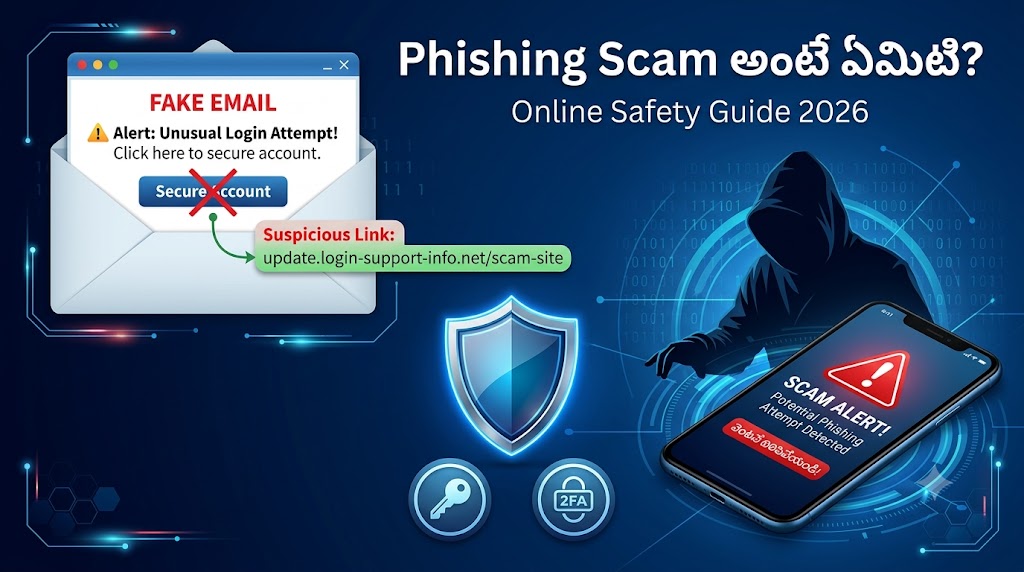
పరిచయం (Introduction)
మీకు ఒక message వచ్చింది: “మీ bank account suspend అవుతుంది, ఇప్పుడే ఇక్కడ click చేయండి!”
మీరు భయపడి ఆ link click చేశారు. అంతే — మీ password, OTP, bank details అన్నీ scammer చేతిలో పడిపోయాయి.
ఇది Phishing Scam. మన దేశంలో రోజూ వేలాది మంది ఇలాంటి మోసాలకు బలి అవుతున్నారు. Students, office workers, shoppers, senior citizens , ఎవరూ exempt కాదు.
ఈ article లో మీకు phishing scam అంటే ఏమిటో, fake emails మరియు fake links ఎలా గుర్తించాలో, మరియు మిమ్మల్ని మీరు ఎలా protect చేసుకోవాలో చాలా simple Telugu లో చెప్తాను.
Phishing Scam అంటే ఏమిటి?
Phishing అంటే scammer మీకు నమ్మకమైన వ్యక్తి లేదా company లా pretend చేసి మీ personal information దొంగిలించే మోసం.
ఈ పేరు “fishing” అనే word నుండి వచ్చింది. చేపలు పట్టేటప్పుడు గాలం వేసి ఆకర్షిస్తారు కదా అలాగే scammers మీకు fake message లేదా link అనే “గాలం” వేసి మీ data దొంగిలిస్తారు.
వీళ్ళు దొంగిలించేది:
- Bank passwords మరియు PIN numbers
- Credit/Debit card details
- OTP (One Time Password)
- Email మరియు social media passwords
- Aadhaar, PAN వంటి personal documents
Phishing ఎవరికైనా రావచ్చు , tech-savvy అయినా, అనుభవం ఉన్నా సరే. ఎందుకంటే ఈ messages చాలా real గా, professional గా కనిపిస్తాయి.
Fake Emails ఎలా కనిపిస్తాయి?
Phishing emails చాలా తెలివిగా design చేస్తారు. కానీ కొన్ని signs ఉంటాయి:
1. Strange Sender Address
Real SBI email వస్తే అది support@sbi.co.in నుండి వస్తుంది. కానీ fake email వస్తే అది ఇలా ఉంటుంది:
support@sbi-alert.comnoreply@sbionline.netsbi.security@gmail.com
Sender address carefully చూడండి. Domain name (@ తర్వాత వచ్చే part) అసలు company domain అవునా కాదా అని verify చేయండి.
2. Urgency మరియు Threats
Phishing emails లో ఎప్పుడూ urgency ఉంటుంది:
- “మీ account 24 గంటల్లో close అవుతుంది!”
- “ఇప్పుడే verify చేయకపోతే మీ account block అవుతుంది!”
- “Last warning!”
Real companies ఎప్పుడూ ఇంత panic create చేయవు.
3. Spelling Mistakes మరియు Grammar Errors
Fake emails లో తప్పులు చాలా common గా ఉంటాయి. “Dere Customer” లేదా “Kindly do the needfull” వంటి phrases చూస్తే alert అవ్వండి.
4. Suspicious Attachments
మీరు expect చేయని attachments ఉంటే — .exe, .zip, .pdf files — open చేయకండి. వాటిలో malware ఉండవచ్చు.
5. Generic Greetings
Real bank never “Dear Customer” అని పంపదు. మీ name తెలుసు కాబట్టి “Dear Rajesh” అని పంపుతుంది. Generic greetings scam sign.
Fake Links ఎలా గుర్తించాలి?
Link చూసి మోసపోవడం చాలా easy. కానీ కొన్ని points గుర్తుపెట్టుకుంటే safe గా ఉండవచ్చు.
1. Domain Name Carefully చూడండి
Scammers real websites లా కనిపించే domains use చేస్తారు:
| Real Website | Fake Website |
|---|---|
www.sbi.co.in | www.sbi-online.net |
www.amazon.in | www.amazon-offers.com |
www.paytm.com | www.paytm-wallet.in |
Main domain (.com, .in కి ముందు వచ్చే word) మాత్రమే important. Extra words, hyphens ఉంటే fake!
2. HTTPS చూడండి — కానీ Trust చేయకండి!
https:// మరియు lock icon ఉంటే safe అని చాలా మంది అనుకుంటారు. కానీ scammers కూడా HTTPS use చేస్తారు. ఇది necessary condition, sufficient కాదు.
3. Shortened URLs కి జాగ్రత్త
bit.ly/xyz123 లేదా t.co/abc వంటి shortened links వచ్చినప్పుడు directly click చేయకండి. unshorten.it వంటి sites లో check చేయండి.
4. Desktop లో Hover చేయండి
Desktop లో link మీద cursor పెట్టండి (click చేయకండి). Browser bottom లో actual URL కనిపిస్తుంది. అది expected site అవునా కాదా చూడండి.
5. Mobile లో Long Press చేయండి
Mobile లో link మీద long press చేస్తే full URL preview వస్తుంది. అది correct site అవునా కాదా verify చేసిన తర్వాతే open చేయండి.
Phishing Messages ఏ రూపాల్లో వస్తాయి?
Phishing ఒక్క email కే limit కాదు. అనేక channels లో వస్తుంది:
Email Phishing
Bank alerts, order confirmations, account verification అంటూ వచ్చే fake emails.
SMS Phishing (Smishing)
“మీ HDFC account కి suspicious activity detected. ఇప్పుడే verify చేయండి: bit.ly/xxxx”
WhatsApp Phishing
“Congratulations! మీరు ₹50,000 lottery గెలిచారు. ఇక్కడ claim చేయండి!” — Family groups లో వచ్చే fake messages.
Social Media Phishing
Instagram లేదా Facebook లో fake pages నుండి DMs వస్తాయి. Job offers, giveaways, verify your account అంటూ మోసగిస్తారు.
Fake Websites (Pharming)
మీరు real site open చేసినప్పుడు కూడా redirect అయి fake site కి వెళ్ళవచ్చు. Domain carefully check చేయండి.
Voice Phishing (Vishing)
Phone call లో “నేను RBI నుండి మాట్లాడుతున్నాను, మీ account fraud అయింది” అంటూ OTP అడుగుతారు.
Common Red Flags — ఇవి చూస్తే Alert!
ఈ signs ఏవైనా కనిపిస్తే scam అని నిర్ధారించుకోండి:
- Unexpected messages: మీరు కోరుకోకుండా వచ్చిన bank alerts, delivery notifications, job offers
- Too good to be true rewards: Lottery, cashback, free gift అంటూ వచ్చే messages
- Personal information అడగడం: Bank, government, or Amazon ఎప్పుడూ OTP లేదా password email లో అడగవు
- Strange links: Odd spelling, extra hyphens, unknown domains
- Pressure to act fast: “Only 2 hours left!”, “Act now!”
- Suspicious attachments: మీరు expect చేయని files
- Poor design: Blurry logos, bad formatting, inconsistent fonts
Real-Life Examples — జరిగిన Scams
Example 1: Bank Alert Scam
రాజేశ్ కి ఒక SMS వచ్చింది: “SBI: మీ account suspicious activity వల్ల temporarily blocked అయింది. Verify చేయండి: sbi-secure-login.com”
ఆ link real SBI site కాదు. Login credentials enter చేశాడు — అంతే, account empty అయింది.
నిజమేమిటంటే: Real SBI ఎప్పుడూ SMS లో login links పంపదు.
Example 2: Parcel Delivery Scam
అనిత కి message వచ్చింది: “Amazon: మీ parcel deliver చేయలేకపోయాం. ₹29 shipping fee pay చేయండి: amzn-delivery.net”
Link click చేసి card details enter చేసింది. ₹29 కాదు, ₹15,000 account నుండి పోయింది.
Example 3: Job Offer Scam
Student కి WhatsApp లో వచ్చింది: “Work from home job! ₹5000 per day. Registration fee ₹500 only.”
Registration fee పంపాడు — job రాలేదు, money పోయింది.
Example 4: Account Verification Scam
Instagram లో message వచ్చింది: “Your account will be disabled. Verify here to keep it active.”
Link click చేసి login చేశారు — account hacker కి పోయింది.
Fake Link Click చేసిన తర్వాత ఏమి చేయాలి?
Panic అవ్వకండి. Quickly ఈ steps follow చేయండి:
Step 1: Internet disconnect చేయండి WiFi లేదా mobile data immediately off చేయండి. Malware spread కాకుండా ఆపవచ్చు.
Step 2: Passwords మార్చండి Affected account passwords వెంటనే change చేయండి. Other accounts కి same password use చేస్తే అవి కూడా మార్చండి.
Step 3: Bank కి inform చేయండి Financial information enter చేసి ఉంటే bank helpline కి వెంటనే call చేయండి. Card block request ఇవ్వండి.
Step 4: Device scan చేయండి Trusted antivirus software తో full scan చేయండి.
Step 5: Report చేయండి
- Cyber Crime portal: cybercrime.gov.in
- National helpline: 1930
- Bank fraud: Bank helpline number
Step 6: Monitor చేయండి Next few days bank statements, account activity carefully చూడండి.
Phishing నుండి మిమ్మల్ని ఎలా Protect చేసుకోవాలి?
Two-Factor Authentication (2FA) Enable చేయండి
Gmail, Instagram, bank apps అన్నింటికీ 2FA on చేయండి. Password తెలిసినా OTP లేకుండా login చేయలేరు.
Strong Passwords వాడండి
- Minimum 12 characters
- Letters, numbers, symbols combine చేయండి
- Every account కి different password
- Password manager use చేయండి (Bitwarden, 1Password)
Software Update చేయండి
Phone, laptop, apps అన్నీ latest version లో ఉంచండి. Security patches important.
Antivirus Software వాడండి
Trusted antivirus install చేయండి. Malicious sites కి వెళ్ళకుండా warn చేస్తుంది.
Unknown Links Open చేయకండి
Unexpected email లేదా message లో link వస్తే directly open చేయకండి. Official website లో manually type చేసి వెళ్ళండి.
Public WiFi లో జాగ్రత్త
Public WiFi లో banking లేదా shopping చేయకండి. VPN use చేయండి.
Email, SMS, WhatsApp, Social Media Safety — Best Practices
Email Safety
- Unknown sender emails లో attachments open చేయకండి
- Spam filter on చేయండి
- Email address carefully verify చేయండి
SMS Safety
- Bank CBs: Banks 6-digit sender IDs వాడతాయి (SBIBNK, HDFCBK). Unknown numbers నుండి వచ్చే bank alerts fake
- Links click చేయకండి
- OTP ఎవరికీ share చేయకండి — bank employees కూడా అడగరు
WhatsApp Safety
- Unknown contacts నుండి వచ్చే links open చేయకండి
- “Forwarded many times” labels ఉన్న messages కి జాగ్రత్త
- Groups లో వచ్చే lottery, job, cashback messages fake అని assume చేయండి
Social Media Safety
- DMs లో వచ్చే links open చేయకండి
- Giveaways, verify account messages కి respond చేయకండి
- Privacy settings strong గా పెట్టండి
FAQ — తరచుగా అడిగే ప్రశ్నలు
Q: Phishing అంటే ఏమిటి? A: Phishing అంటే — scammer నమ్మకమైన వ్యక్తి లేదా company లా నటించి మీ passwords, bank details, OTP వంటి sensitive information దొంగిలించే cyber crime. ఇది email, SMS, WhatsApp, social media ద్వారా రావచ్చు.
Q: Fake email ఎలా గుర్తించాలి? A: Sender email address carefully చూడండి — real company domain అవునా కాదా verify చేయండి. Spelling mistakes, urgent threats, generic greetings (Dear Customer), suspicious links, unexpected attachments ఉంటే fake email అని అర్థం చేసుకోండి. Real bank లేదా company ఎప్పుడూ email లో password అడగదు.
Q: Link safe అవునా కాదా ఎలా తెలుసుకోవాలి? A: Desktop లో link మీద hover చేసి actual URL చూడండి. Mobile లో long press చేయండి. Domain name carefully check చేయండి — extra hyphens, odd spellings ఉంటే fake. Shortened URLs unshorten.it లో check చేయండి. Doubt ఉంటే official website manually type చేసి వెళ్ళండి.
Q: OTP share చేస్తే ఏమవుతుంది? A: OTP share చేస్తే scammer మీ bank account, UPI, లేదా important accounts access చేయగలరు. Money transfer చేయవచ్చు, account takeover చేయవచ్చు. OTP ఎవరికీ share చేయకండి — bank employee, RBI officer, customer care కూడా OTP అడగరు.
Q: Fake link click చేసిన తర్వాత ఏమి చేయాలి? A: వెంటనే internet disconnect చేయండి, passwords change చేయండి, bank కి call చేయండి, device scan చేయండి, cybercrime.gov.in లో report చేయండి. Helpline 1930 కి call చేయవచ్చు.
Conclusion
Phishing scams చాలా తెలివిగా design అవుతున్నాయి. Real గా కనిపించే fake emails, urgent alerts, attractive offers — ఇవన్నీ మిమ్మల్ని మోసం చేయడానికే.
కానీ ఒక్క విషయం గుర్తుపెట్టుకుంటే చాలు: ఎవరైనా urgent గా link click చేయమని, OTP share చేయమని అడిగితే — ఆగండి, verify చేయండి, అప్పుడే proceed చేయండి.
ఈ article లో చెప్పిన tips follow చేయండి:
- Unknown links click చేయకండి
- OTP ఎవరికీ share చేయకండి
- 2FA enable చేయండి
- Sender address verify చేయండి
- Doubt వస్తే official website manually open చేయండి
మీ family మరియు friends కి కూడా ఈ information share చేయండి — ముఖ్యంగా senior citizens మరియు first-time internet users కి.
Online లో safe గా ఉండండి. Scammers కి chance ఇవ్వకండి!
ఈ article helpful అయిందా? Comments లో మీ అభిప్రాయం చెప్పండి. మీకు తెలిసిన phishing scam experience ఉంటే share చేయండి — అది ఇతరులకు help అవుతుంది.
Cyber security గురించి ఇంకా articles చదవాలంటే మా website subscribe చేయండి.