
Introduction
ప్రస్తుతం స్మార్ట్ఫోన్ మన జీవితంలో అత్యంత ముఖ్యమైన పరికరంగా మారింది. బ్యాంకింగ్, సోషల్ మీడియా, ఫోటోలు, వ్యక్తిగత చాట్స్, OTPలు మరియు ముఖ్యమైన సమాచారం అంతా ఫోన్లోనే ఉంటుంది. అందుకే cyber criminals ఇప్పుడు మొబైల్ ఫోన్లను లక్ష్యంగా చేసుకుంటున్నారు.
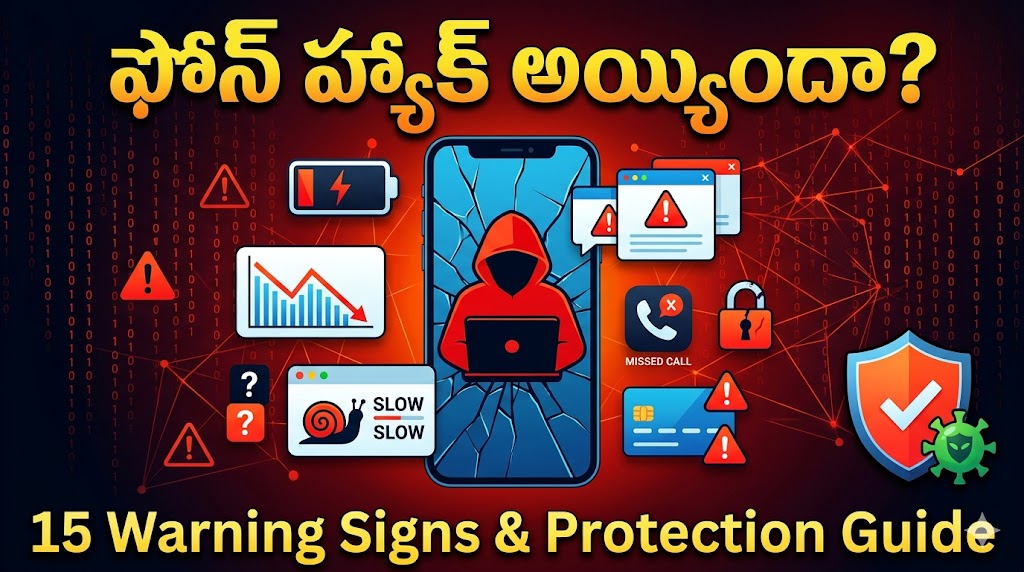
చాలా సందర్భాల్లో ఫోన్ hack అయినా కూడా వినియోగదారులు వెంటనే గుర్తించలేరు. అయితే కొన్ని warning signs ద్వారా మీ phone సురక్షితంగా ఉందా లేదా అనేది తెలుసుకోవచ్చు.
ఈ గైడ్లో phone hack అయ్యిందో ఎలా గుర్తించాలి, ఏ జాగ్రత్తలు తీసుకోవాలి మరియు phone ను ఎలా రక్షించుకోవాలి అనే విషయాలను సులభమైన తెలుగులో తెలుసుకుందాం.
Phone Hacking అంటే ఏమిటి?
Phone hacking అంటే మీ అనుమతి లేకుండా ఎవరైనా మీ మొబైల్లోని సమాచారం, messages, passwords లేదా ఇతర data ను access చేయడం.
ఇది malware, phishing links, fake apps లేదా public Wi-Fi ద్వారా జరగవచ్చు.
Warning Sign #1: Battery త్వరగా ఖాళీ అవడం
సాధారణంగా battery health బాగున్నప్పటికీ battery అసాధారణంగా వేగంగా drain అయితే background లో malicious apps పని చేసే అవకాశం ఉంటుంది.
గమనించాల్సిన విషయాలు
- Phone ఎక్కువగా వేడెక్కడం
- Screen off లో ఉన్నప్పటికీ battery drain అవడం
- Usage కి మించిన battery consumption
Warning Sign #2: Phone Slow అవడం
Phone అకస్మాత్తుగా చాలా slow గా మారితే background processes కారణం కావచ్చు.
Symptoms
- Apps open కావడానికి ఎక్కువ సమయం
- Frequent hanging
- Unexpected restarts
Warning Sign #3: Unknown Apps కనిపించడం
మీరు install చేయని apps phone లో కనిపిస్తే జాగ్రత్త.
కొన్ని malware apps hidden గా install అవుతాయి.
Warning Sign #4: Data Usage పెరగడం
Hackers background లో data transfer చేయవచ్చు.
Check చేయండి
Settings → Mobile Data Usage
అసాధారణంగా data usage పెరిగితే కారణం తెలుసుకోండి.
Warning Sign #5: Unknown SMS లేదా Calls
మీరు పంపని SMSలు లేదా call logs కనిపిస్తే phone compromise అయ్యి ఉండవచ్చు.
Warning Sign #6: Pop-up Ads ఎక్కువగా రావడం
Browser open చేయకపోయినా ads వస్తే adware infection అయ్యి ఉండే అవకాశం ఉంది.
Warning Sign #7: Banking Alerts
మీరు చేయని transactions లేదా OTP requests వస్తే వెంటనే చర్యలు తీసుకోవాలి.
Phone Hack అయితే వెంటనే ఏమి చేయాలి?
Step 1
Internet disconnect చేయండి.
Step 2
Suspicious apps uninstall చేయండి.
Step 3
Bank passwords మార్చండి.
Step 4
Google account security check చేయండి.
Step 5
Antivirus scan run చేయండి.
Phone Hack కాకుండా ఉండాలంటే?
Safe Practices
- Official Play Store నుంచే apps install చేయండి
- Unknown links click చేయవద్దు
- Public Wi-Fi లో banking చేయవద్దు
- Strong passwords ఉపయోగించండి
- Two-Factor Authentication enable చేయండి
Android vs iPhone Security
| Feature | Android | iPhone |
|---|---|---|
| App Installation | Flexible | Restricted |
| Malware Risk | Higher | Lower |
| Security Updates | Depends on Brand | Direct Updates |
| Customization | High | Moderate |
Phone Hack అవడానికి ప్రధాన కారణాలు
చాలా మంది phone hack అవడం అంటే hackers ప్రత్యేకంగా target చేస్తారని అనుకుంటారు. కానీ వాస్తవానికి చాలా hacks వినియోగదారుల చిన్న పొరపాట్ల వల్లే జరుగుతాయి.
- Unknown links పై click చేయడం
- Fake apps install చేయడం
- Public Wi-Fi ఉపయోగించడం
- Weak passwords పెట్టడం
- Software updates ignore చేయడం
- OTPలను ఇతరులతో share చేయడం
Cyber criminals ఎక్కువగా వినియోగదారుల అజాగ్రత్తను ఉపయోగించుకుంటారు.
Malware అంటే ఏమిటి?
Malware అనేది మీ device కు హాని చేసే software. ఇది phone లోకి వచ్చిన తర్వాత data theft, spying లేదా banking fraud వంటి సమస్యలకు కారణం కావచ్చు.
Malware రకాలు
- Spyware
- Adware
- Trojan Apps
- Ransomware
- Keyloggers
ఈ malware లు background లో పని చేస్తూ మీ personal information ను దొంగిలించే అవకాశం ఉంటుంది.
Public Wi-Fi ఎందుకు ప్రమాదకరం?
Airport, railway station, mall లేదా café లలో free Wi-Fi అందుబాటులో ఉంటుంది. అయితే ఇవి ఎల్లప్పుడూ సురక్షితం కావు.
Hackers fake Wi-Fi networks create చేసి వినియోగదారుల data ను capture చేసే ప్రయత్నం చేయవచ్చు.
- Banking transactions చేయవద్దు
- Password loginలు avoid చేయండి
- VPN ఉపయోగించడం మంచిది
Android Users కోసం Security Checklist
- Google Play Protect ON చేయండి
- Unknown Sources OFF చేయండి
- Apps permissions regularly check చేయండి
- Automatic updates enable చేయండి
- Screen lock ఉపయోగించండి
iPhone Users కోసం Security Checklist
- Latest iOS updates install చేయండి
- Face ID లేదా Passcode enable చేయండి
- Apple ID Two-Factor Authentication ON చేయండి
- Unknown profiles remove చేయండి
- iCloud security settings check చేయండి
Phone Hack అయితే Banking Accounts ఎలా రక్షించాలి?
Phone compromise అయ్యిందని అనుమానం వచ్చిన వెంటనే financial accounts ను secure చేయాలి.
- Bank app passwords మార్చండి
- UPI PIN reset చేయండి
- Net Banking password update చేయండి
- Credit card transactions monitor చేయండి
- Suspicious activity ఉంటే bank కు సమాచారం ఇవ్వండి
Phone Factory Reset ఎప్పుడు చేయాలి?
Malware తొలగించలేకపోతే లేదా phone లో suspicious behavior కొనసాగితే factory reset ఒక option కావచ్చు.
అయితే reset చేసే ముందు:
- Photos backup తీసుకోండి
- Contacts save చేసుకోండి
- Important documents export చేయండి
Factory reset తరువాత trusted apps మాత్రమే install చేయండి.
2026లో పెరుగుతున్న Mobile Threats
- AI-powered phishing scams
- Fake banking apps
- QR code scams
- Screen-sharing frauds
- WhatsApp account takeover attacks
ఈ threats గురించి అవగాహన కలిగి ఉండటం mobile security లో మొదటి అడుగు.
Cyber Security Experts సూచనలు
Security experts ప్రకారం mobile security కోసం మూడు విషయాలు అత్యంత ముఖ్యమైనవి:
- Regular software updates
- Strong passwords
- Two-Factor Authentication
ఈ మూడు అలవాట్లు మాత్రమే అనేక cyber attacks నుంచి వినియోగదారులను రక్షించగలవు.
Final Conclusion
Phone hacking అనేది ప్రస్తుతం ప్రపంచవ్యాప్తంగా పెరుగుతున్న cyber security సమస్యల్లో ఒకటి. కానీ సరైన జాగ్రత్తలు తీసుకుంటే చాలా వరకు ప్రమాదాలను నివారించవచ్చు. Unknown links, fake apps మరియు suspicious messages నుండి దూరంగా ఉండటం ద్వారా మీ personal data మరియు financial information ను సురక్షితంగా ఉంచుకోవచ్చు.
Phone Security కోసం 10 Golden Rules
Smartphone security anedi kevalam antivirus install cheyadam tho poorthi kaadu. Prati user konni basic security habits follow cheyali.
- Strong password leda PIN use cheyyandi
- Fingerprint leda Face Unlock enable cheyyandi
- Unknown apps install cheyyakandi
- Operating system updates miss avvakandi
- Public Wi-Fi lo banking cheyyakandi
- OTP evaritho share cheyyakandi
- Regular backups maintain cheyyandi
- Google Play Protect ON lo unchandi
- App permissions monthly review cheyyandi
- Suspicious links ni avoid cheyyandi
Parents పిల్లల Phone Security ఎలా కాపాడాలి?
2026 lo pillalu chinna vayassulone smartphones vadutunnaru. Parents digital safety gurinchi awareness kaligi undali.
- Screen time limits set cheyyandi
- Parental controls enable cheyyandi
- Unknown apps download cheyyakunda cheppandi
- Online strangers tho chat cheyyakudadani nerpinchandi
- Privacy settings gurinchi avagahana kalpinchandi
Phone Hack Prevention Checklist
| Security Action | Status |
|---|---|
| Strong Password | ✅ Recommended |
| Two-Factor Authentication | ✅ Highly Recommended |
| Software Updates | ✅ Essential |
| Unknown Apps Avoid | ✅ Essential |
| Public Wi-Fi Caution | ✅ Important |
Real-Life Example
Chala mandi users fake bank message vachindani link open chestaru. Aa website original bank site laga kanipinchina, credentials enter chesina ventane hackers account details capture cheyyagalru. Anduke URL ni check cheyyadam, official apps matrame use cheyyadam chala mukhyam.
Cyber security experts cheppedi okkate: Prevention is better than recovery. Oka sari personal data leak ayyaka damage ni poorthiga reverse cheyyadam kastam avvachu.
FAQ
Phone hack అయితే photos దొంగిలించగలరా?
అవును. Phone access లభిస్తే photos మరియు files access చేసే అవకాశం ఉంటుంది.
Factory Reset చేస్తే hacking తొలగిపోతుందా?
చాలా సందర్భాల్లో malware తొలగిపోతుంది. కానీ ముఖ్యమైన data backup తీసుకోవాలి.
Free antivirus సరిపోతుందా?
Basic protection కోసం ఉపయోగపడుతుంది. కానీ safe browsing మరింత ముఖ్యమైనది.
Phone hack అయ్యిందో ఖచ్చితంగా ఎలా తెలుసుకోవాలి?
Unusual activity, unknown apps, data usage మరియు suspicious banking alerts ముఖ్యమైన సంకేతాలు.
Useful External Resources
Conclusion
స్మార్ట్ఫోన్ భద్రత ప్రతి ఒక్కరికీ అత్యంత ముఖ్యమైన విషయం. Phone hack అయిన సంకేతాలను ముందుగానే గుర్తిస్తే పెద్ద నష్టాలను నివారించవచ్చు. Strong passwords, regular updates మరియు safe internet practices ద్వారా మీ personal data ను రక్షించుకోవచ్చు.
Privacy vs AI: Personal Data Safety Guide